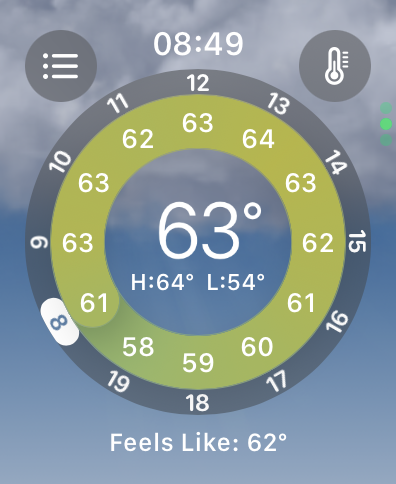
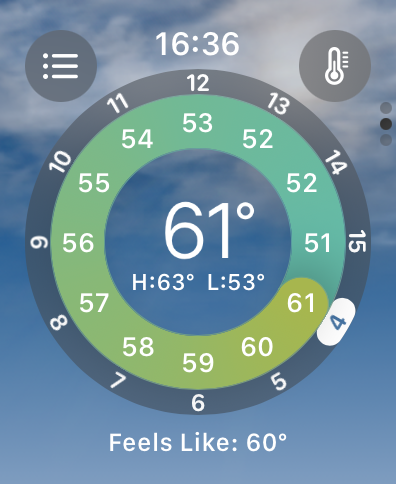
I took these two screenshots on my Apple Watch the same day (2023-12-29).
Look at the hour numbers on the grey outer ring.
|
|
|
In the first screenshot, taken at 0849, the numbers on the outer ring show the "next" twelve hours, as expected. The number highlighted in the white pill shape is the current hour.
In the second screenshot, taken at 1636, the numbers on the outer ring are wrong. The number in the white pill is supposed to be the current hour - it's showing 4 when it should be 16. I'm guessing the temperatures are correct, i.e. that the forecasted temperature for 3am (now plus 11 hours) is 51F, but the numbers in the outer ring are wrong (i.e. they should be 16 to 23, then 0 to 3).
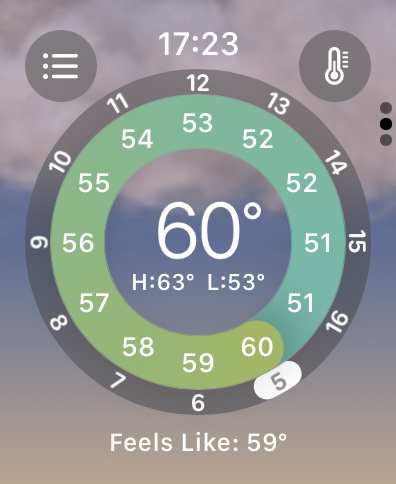
The third screenshot was taken after a Tier-1 support person told me to "force restart" the watch (i.e. hold the crown and the side button for ten seconds, until the screen goes black and the Apple logo appears). After it rebooted I put in my password and then ran the weather app. It took about 20 seconds to load weather data, but then showed the same problem again.